
Display Brief Anatomy
A display brief becomes useful when it explains more than the intended look. It connects the project goal, shopper viewpoint, product priority, site conditions, operational requirements, evidence, assumptions, ownership, and unresolved decisions.
A polished reference image may show a composition, but it rarely confirms the conditions behind it. Dimensions, display depth, inventory quantity, attachment, maintenance access, installation sequence, asset usage status, and budget may remain unmeasured.
The purpose of a display brief template is to make those hidden conditions reviewable before the concept moves further into design or production.

What the Display Brief Needs to Decide
Start with the decision facing the team. The same display brief structure will not serve a shallow storefront window, an entrance focal point, and a temporary pop-up in the same way.
Ask what the team is comparing or adapting: two storefront concepts, a seasonal campaign across different footprints, or a product-focus display that must be replenished without dismantling its focal arrangement. That decision determines which fields need the closest review.
A useful brief records:
- What the display is intended to communicate
- Who it is addressing and from which approach angles
- Which product or message has priority
- What the reference visibly shows
- What the concept appears to assume
- What the retailer, brand, site, and production teams require
- Who owns each confirmation
- Which decisions must be revisited before production
Design briefing research describes the brief as a working document that connects objectives, requirements, responsibilities, resources, and later validation. Its format can change with project size; its value lies in keeping the proposed response connected to the actual problem and constraints.
Display Brief Anatomy: Core Fields
Each field should answer a distinct question. A single broad paragraph should not carry the project goal, visual direction, operational details, and approval status at once.
Project Goal
State the purpose of the display in practical terms. It may support a seasonal campaign, a new product presentation, an entrance focal point, a window refresh, or a temporary environment.
Record the goal as a target defined by the client or retailer. If a business metric matters, include its baseline, time period, measurement owner, and test conditions. A target belongs in the brief as an objective, not as evidence that the display will produce a particular result.
- Project name and campaign period
- Display location or format
- Business or communication objective
- Required launch date
- Known campaign dependencies
- Relevant baseline or measurement plan
- Person responsible for confirming the objective
Audience and Shopper View
Describe the intended audience in the retailer’s own language, then describe how the display will be encountered. The shopper may approach from one direction, several directions, or a changing path through a mall, entrance, or temporary environment.
Record documented approach angles rather than treating one front-facing view as representative of every position. For each angle, note:
- What appears first and second
- Where the hero product sits
- Which message is readable
- What competes within the same frame
- What the backdrop, fixture, prop, or graphics obscure
- Whether the intended hierarchy remains legible from another position
Terms such as focal point and visual hierarchy can give stakeholders a shared vocabulary. They remain descriptions or review prompts unless the project includes a documented method for measuring shopper response.
Product Priority
Identify the hero product or product group before discussing decorative treatment. A concept can appear coherent while giving similar visual weight to the product, supporting items, graphics, props, and background treatment.
Document the product hierarchy, required orientation, displayed quantity, dimensions, packaging information, product details, campaign changes, replenishment method, security questions, and approval owner.
The image shows what is visible in the reference. It does not confirm that the proposed quantity fits the fixture, that the product can be reached, or that the arrangement can be replenished without disturbing the focal composition.
Placement and Approach Angle
Placement includes the relationship between the display, store interior, entrance, neighboring fixtures, circulation paths, and shopper approach. Keep available site information separate from concept interpretation.
A sketch or render may suggest a position, but it does not establish the actual footprint, clearance, ceiling height, glazing condition, power location, or neighboring activity.
- Display location and store or entrance relationship
- Primary and secondary approach angles
- Available footprint and display depth
- Height restrictions
- Nearby fixtures or obstructions
- Interior sightlines affected by the display
- Known access or circulation conditions
- Site survey status and responsible owner
A backdrop may frame a focal action while reducing visibility into the store. Treat that as a comparison question. Compare open and closed treatments from the same documented viewpoints.
Visual and Messaging Hierarchy
Describe the order in which the concept intends to be read or understood. The hierarchy may involve a hero product, campaign graphic, headline, price message, prop, lighting feature, or architectural frame.
- Primary visual focal point
- Secondary product or supporting element
- Primary message and supporting copy
- Price or promotional information
- Brand marks and product callouts
- Decorative elements
- Negative-space requirements
- Elements that must not compete with the hero product
From each approach angle, describe what the image shows rather than claiming what every shopper will notice. If the hero product is partly obscured, record the observation and assign a review owner.
From Reference Image to Reviewable Brief
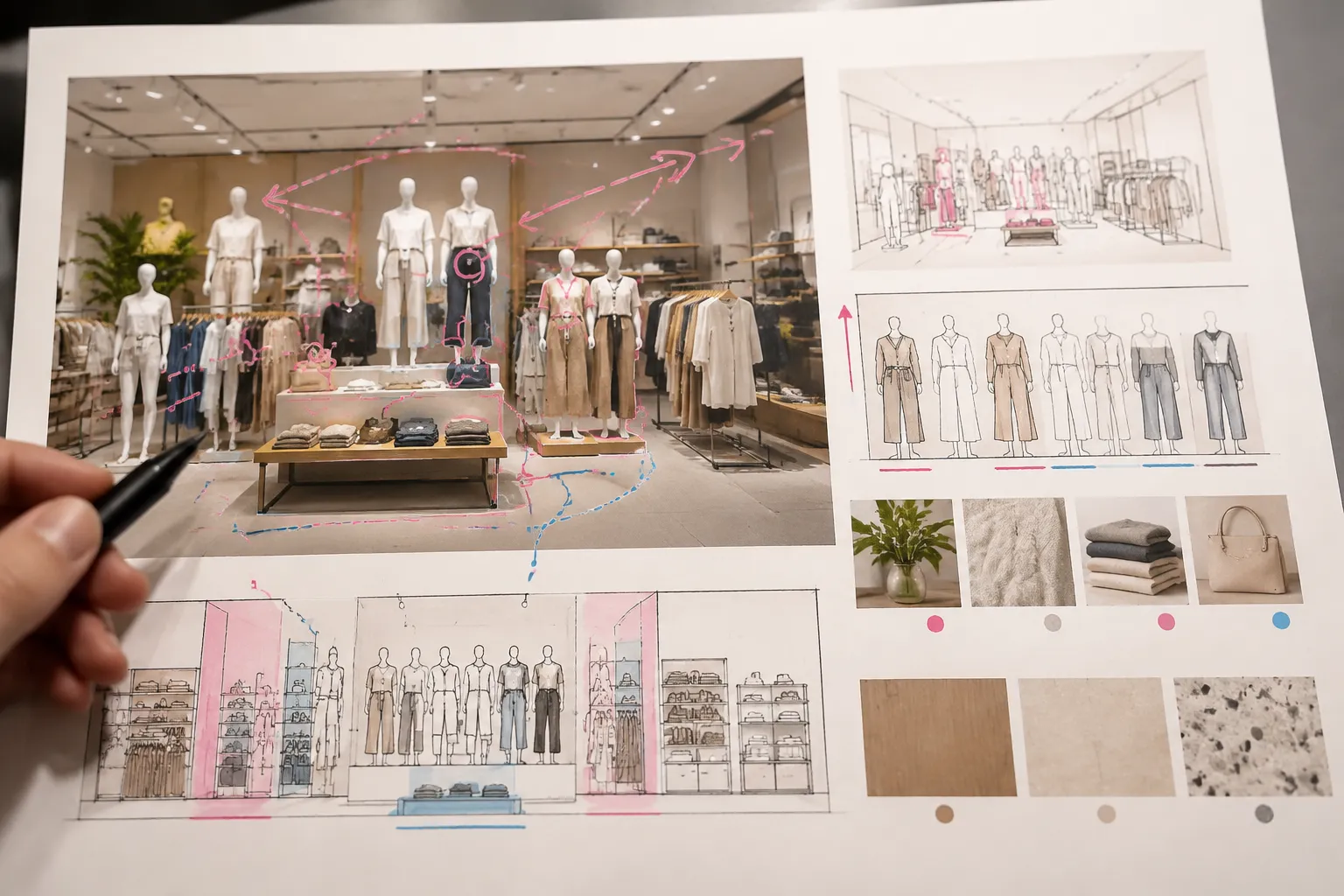
A reference image is an input, not a specification. Translate it into visible evidence, documented requirements, stakeholder targets, inferences, and unconfirmed assumptions.
Direct Visual Observation
This describes what can be seen in an image or concept preview:
- A central product is framed by a contrasting backdrop.
- The display uses two visible height levels.
- A graphic panel occupies the upper portion of the composition.
- The store interior is partly obscured behind a closed background.
- Several products appear grouped on one fixture.
- Lighting is represented, but its equipment and power source are not shown.
Use precise language. “The image shows” preserves the evidence level; it does not turn a visual reference into a measured conclusion.
Documented Requirement and Stakeholder Target
A documented requirement comes from an identified retailer document, brand guideline, site survey, equipment specification, asset record, or other project source. Record the document name, version, date, owner, and affected decision where available.
A stakeholder target is a requested outcome or preference that has not yet been validated through measurement or production review. Examples include keeping the hero product visible from three approach angles, adapting the campaign to two footprints, supporting scheduled product rotation, or using a specified finish.
Targets guide design work. They should not be rewritten as confirmed performance.
Inference and Unconfirmed Assumption
An inference connects visible evidence to a likely implication. A deep plinth may appear to support several products, but it may also reduce customer-side space or complicate replenishment. Keep that implication labeled until the site, inventory, and operations teams review it.
An unconfirmed assumption is a condition the concept appears to rely on without documented support. Common examples include:
- The backdrop can attach to the existing structure.
- The proposed fixture can support the displayed quantity.
- Lighting can use an available power source.
- Products can be replenished through concealed access.
- The render footprint matches the actual site.
- An asset can be used in the required territory and campaign period.
- The installation team can work within the available access window.
A polished mockup is still a preview. It does not resolve these questions.
Display Brief Evidence and Assumption Log
Keep the evidence log beside the creative fields. It gives each important statement a status, provenance, affected decision, owner, and next confirmation.
| Field | What to record |
|---|---|
| Entry ID | A short reference for discussion and revision tracking |
| Brief section | Product, placement, hierarchy, materials, installation, or another field |
| Statement | The specific observation, requirement, target, or assumption |
| Evidence type | Observation, documented requirement, target, suggestion, inference, or unconfirmed assumption |
| Source or provenance | Image, file, survey, guideline, specification, supplier document, or stakeholder discussion |
| Usage status | Approved, source-listed, pending confirmation, restricted, or unknown |
| Affected decision | The concept choice or production question influenced by the entry |
| Owner and required action | The responsible person or team, plus survey, review, prototype, costing, or approval activity |
| Status and revision note | Open, under review, confirmed, changed, or closed, with what changed and why |
Weak entry:
Large backdrop may work.
Stronger entry:
The concept uses a closed backdrop behind the hero product. Confirm whether the resulting reduction in store sightline is acceptable from the documented entrance approach. Owner: retail design. Evidence status: concept-stage observation and unconfirmed site implication.
The stronger entry does not decide the issue. It makes the issue assignable.
Provenance and Usage Status
Record where reference images, graphics, product images, textures, type treatments, and campaign assets came from. Note whether usage status is source-listed, pending, restricted, or unknown.
This is a documentation practice, not a legal conclusion. Questions about brand permissions, image rights, territory, duration, and third-party assets should be assigned to the relevant rights-holder, brand, or project reviewer.
Evidence Status Labels
- Visible: Shown directly in the reference or concept
- Documented: Supported by an identified project document
- Measured: Confirmed through a recorded measurement
- Illustrative: Included to communicate direction rather than specification
- Source-listed: Provenance recorded, usage status still under review
- Inferred: A reasoned implication from visible or documented information
- Unconfirmed: Not yet supported by project evidence
- Changed: Previously recorded information has been revised
- Closed: Required confirmation completed and documented
Comparing Display Concepts
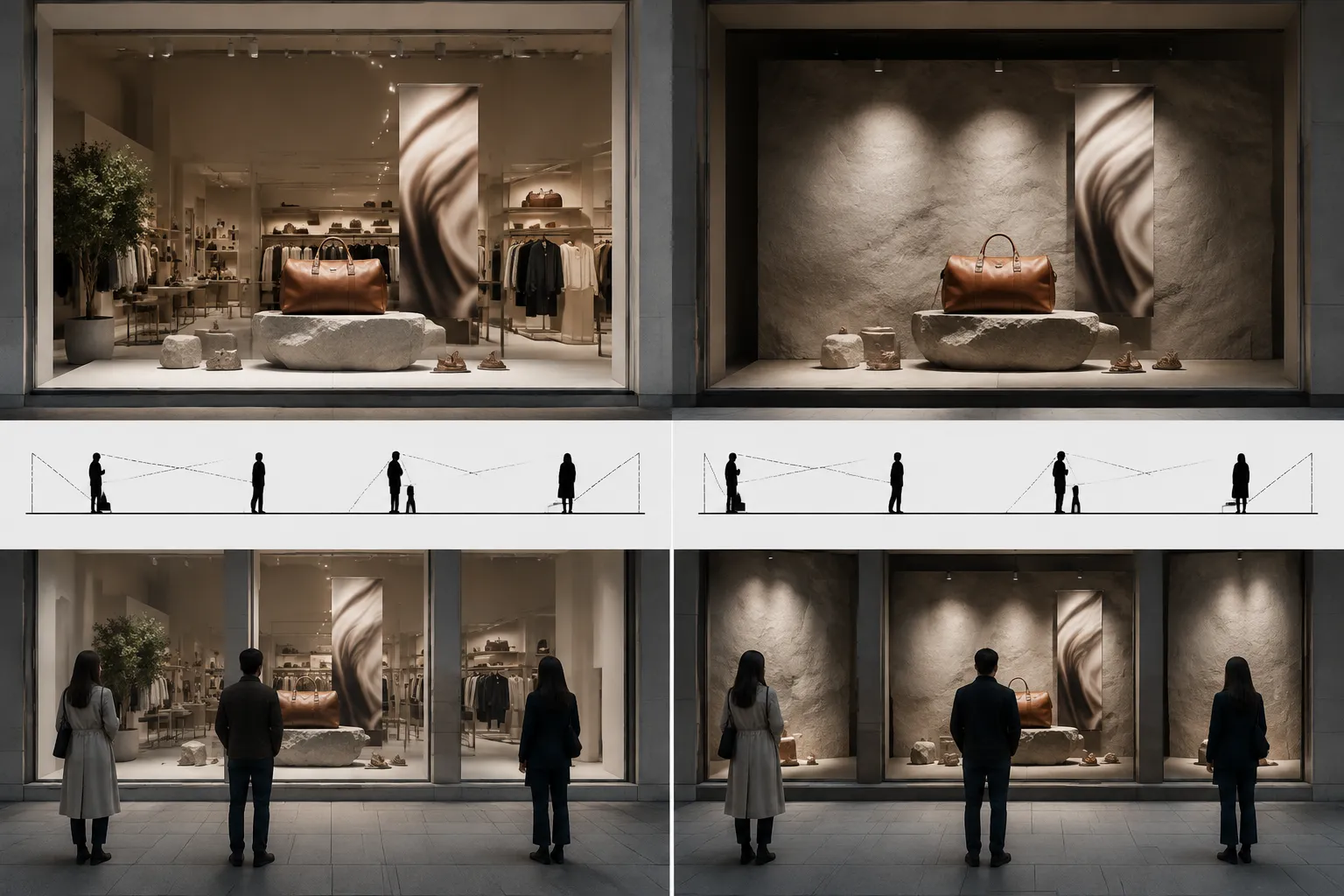
Concept comparison becomes unreliable when each option is judged against different expectations. Use the same shopper, product, space, material, and operational criteria for every option.
| Decision | Option A may favor | Option B may favor |
|---|---|---|
| Open or closed backdrop | A more controlled frame around the hero product | More visibility between the display and store interior |
| Single view or multiple viewpoints | A carefully controlled sightline | A composition adapted to more than one approach position |
| Decorative treatment or product clarity | A stronger campaign frame or material statement | Less competition around product and information |
| Fixed or adaptable fixture | A specific composition and product arrangement | Product rotation or more than one campaign version |
These are design tensions, not universal outcomes. Inspect each option from the same documented approach angles and record what is framed, hidden, repeated, or made difficult to replenish.
Open Versus Closed Backdrop
An open treatment may preserve a view into the store. A closed treatment may frame the hero product more strongly while obscuring part of the interior sightline.
- What the backdrop frames and hides
- Which approach angles it affects
- Whether the hero product remains distinct
- How graphics are mounted
- How attachment is proposed
- Whether material and finish information is documented
- How maintenance and replenishment access are affected
Single View Versus Multiple Viewpoints
A front-facing composition may favor one controlled sightline. A radial, tiered, or multi-angle arrangement may distribute the composition across several positions while introducing competing focal points.
Do not assume that more viewpoints produce better results. Document the intended viewing sequence and inspect whether the hierarchy remains readable from each position.
Decorative Treatment Versus Product Clarity
Props, lighting, graphics, and strong finishes can support a campaign idea. They can also compete with the hero product or make product information harder to locate.
Compare contrast, relative scale, lighting weight, negative space, competing focal points, information visibility, cleaning access, replacement needs, and obstruction of product access. Keep the comparison at the level of visible arrangement and review implications.
Fixed Fixture Versus Adaptable Fixture
A fixed fixture may preserve a specific composition. An adaptable fixture may support product rotation, but it can introduce additional assembly, storage, and maintenance questions.
Record the fixture type, attachment method, quantity, adjustment range, replenishment route, storage requirement, assembly method, finish, security hardware, maintenance access, and whether each variation requires new drawings, prototypes, or costing.
Operational Requirements Hidden by the Mockup
The brief should account for the people who install, merchandise, replenish, clean, repair, update, and remove the display.
Inventory and Replenishment
State how much product is displayed and how often it may change. Then describe the access required to replenish it.
- Does replenishment require moving the hero product?
- Can staff reach the storage or access point?
- Does the arrangement depend on a fixed quantity?
- Are replacement products the same size and packaging format?
- Can graphics or props be removed without dismantling the focal structure?
- Who confirms the replenishment method?
A render may show an ideal arrangement without showing the handling sequence. That missing sequence belongs in the brief.
Maintenance, Assembly, and Installation
Record cleaning access, replaceable components, graphic updates, lighting access, repair routes, finish care, security checks, spare-part storage, and responsibility for condition checks.
Separate design intent from installation information. Identify the proposed assembly sequence, fabricated components, delivery assumptions, setup-time target, tools or equipment named by the project, attachment points requiring review, installation owner, merchandising handoff, and removal or reset requirements.
Attachment, stability, circulation, emergency routes, materials, lighting, power, security hardware, and local site conditions require current project documentation and qualified review appropriate to the actual location and use. A commercial workflow can suggest questions, but it does not establish suitability for another project.
Retailer, Brand, and Site Inputs
These information types should remain separate because they have different origins and owners.
Retailer Requirements
Current retailer documents may cover fixture types, store-format variations, installation windows, graphic specifications, security procedures, maintenance routines, product presentation, local exceptions, and approval stages. A supplier description of one retailer’s process is an example of terminology, not a rule for every retailer.
Brand Guidance
Record approved logos, color references, typography, product photography, campaign language, graphic hierarchy, asset versions, and usage period against the relevant file or guideline version. Keep unresolved asset questions separate from visual preference.
Site Information
Record the measured footprint, display depth, ceiling or glazing conditions, existing fixtures, power availability, access route, circulation relationship, nearby obstructions, installation timing, and local review requirements.
Do not infer exact dimensions, load capacity, electrical suitability, accessibility conditions, fire performance, or installation approval from a visual reference. Location-specific accessibility and fire references can define questions for review, but they do not replace project documentation.
Ownership and Change Dependencies
A reviewable brief names the owner for each type of information. Shared responsibility without a named owner often leaves the question open.
- Project goal: client or campaign owner
- Audience and product priority: merchandising or marketing owner
- Approach angles and site measurements: site survey owner
- Visual hierarchy: design owner
- Product quantity and replenishment: merchandising or store operations owner
- Fixture and materials: design and production owners
- Attachment and engineering questions: qualified project reviewer
- Prototype: production or engineering owner
- Graphics and asset versions: brand or creative operations owner
- Installation sequence: installation owner
- Maintenance and updates: store operations owner
- Usage status: relevant brand or rights-holder reviewer
- Schedule and budget: project owner
The role list should match the actual project. It does not imply that every project requires the same organization or professional role.
A revised footprint may affect sightlines, display depth, product quantity, fixture dimensions, materials, assembly, delivery, installation timing, and cost. A finish change may affect samples, maintenance, graphics, or prototype work.
Use a change log to record the requested change, original field, new requirement, reason, affected drawings or assets, owner, required review, schedule effect, cost effect, and approval status. Do not present a budget figure or production date as confirmed without supporting project documentation.
Illustrative Comparison: Two Window Concepts
Consider a non-final seasonal storefront comparison. Concept A uses a closed backdrop, one central plinth, a large campaign graphic, and one hero-product arrangement. Concept B uses an open background, two product levels, smaller graphics, and visible shelving behind the display.
Begin with the same brief fields. Concept A may favor a controlled frame from the documented entrance approach, while Concept B may preserve more visibility into the store. From a side approach, inspect whether the product remains identifiable, whether rear shelving introduces competing information, and whether either concept loses its intended hierarchy.
For Concept A, record backdrop attachment, graphic mounting, maintenance access, and the effect of the closed background on the interior sightline. For Concept B, record shelving availability, replenishment for both levels, and whether the second level creates competing priorities.
Neither conclusion is established by the mockup alone. Confirm product dimensions, quantity, access, replenishment, fixture information, footprint, and site sightlines.
| Decision | Concept A | Concept B |
|---|---|---|
| Main focal treatment | Closed backdrop frames the central product | Open background exposes store context |
| Visible evidence | Backdrop and plinth appear in the concept | Product levels and rear shelving appear in the concept |
| Unconfirmed assumption | Backdrop attachment and site footprint | Rear shelving remains available and visually acceptable |
| Operational question | Can staff replenish without moving the frame? | Can staff replenish both levels without disturbing hierarchy? |
| Required confirmation | Site information, attachment, material, and access | Site sightline, inventory, access, and fixture details |
Display Brief Review Questions
Shopper View
- What appears first from each documented approach angle?
- Where is the focal point, and what competes with it?
- Is the hero product distinguishable from the backdrop and graphics?
- What is obscured?
- Does the hierarchy remain legible from other positions?
- Are product and price details visible where the brief requires them?
Product and Operations
- What quantity is shown, and is it documented or illustrative?
- Can products be replenished without dismantling the focal arrangement?
- Are product dimensions and packaging versions confirmed?
- What changes when the assortment or inventory level changes?
- Is security hardware shown, specified, or unconfirmed?
- Who owns maintenance, rotation, and condition checks?
Site, Materials, and Installation
- Is the footprint measured and the display depth documented?
- Which materials and finishes are specified?
- What attachment, lighting, power, circulation, and access questions remain open?
- What installation sequence is proposed?
- Which items require site documentation or qualified review?
- What happens during removal, reset, or campaign change?
Assets and Approval Inputs
- Is provenance recorded for each reference and campaign asset?
- Is usage status known for each asset?
- Are brand files and versions current?
- Which retailer requirements are documented?
- Which statements are targets rather than requirements?
- Who approves the concept, product presentation, graphics, and site adaptation?
- Which changes require renewed approval?
Common Misunderstandings
The Reference Is the Specification
A reference communicates appearance. A specification communicates documented or measurable project requirements. A suspended element in an image does not confirm its attachment, load, or installation method.
A Sales Target Is Evidence
A business target may matter to the project, but it remains a target until the team defines how it will be measured under stated conditions. Record the baseline, period, owner, and test conditions without presenting the concept as likely to achieve the result.
Visual Hierarchy Predicts Shopper Behavior
Hierarchy language describes intended order. It does not establish what every shopper will notice or how people will behave. Use it to frame observations and review questions.
A Detailed Brief Removes Uncertainty
A detailed brief makes assumptions visible and creates an ownership trail. It cannot resolve every site, material, installation, asset, or operational question on its own.
When to Move to the Next Review
A concept has reached a useful review point when the team can explain its choices and open questions without relying on the mockup alone.
- Specific project goal and product priority
- Documented approach angles and visual hierarchy
- Inventory, replenishment, maintenance, and access information
- Footprint and display-depth status
- Fixture, material, finish, and graphic fields
- Retailer and brand requirements separated by source
- Evidence and assumption log with provenance records
- Named owners for unresolved items
- Change record for revised requirements
- Approval inputs and conditions for the next review
The completion condition is not that every question has already been answered. It is that every important unknown has been identified, assigned, and connected to the decision it may affect.
A display brief template is strongest when it preserves the difference between an attractive idea and a reviewable project definition. Record the next comparison, measurement, source check, or qualified review in the production handoff.
Sources
- AI assistance in enterprise UX design workflows: enhancing design brief creation for designers
- Strategies for improving briefing framework: an evaluation study with industry practitioners
- Enhanced project brief: structured approach to client-designer interface
- Client briefing issues and problems for requirement elicitation and validation: A survey among architects
- ADA Accessibility Standards
- AG 1091A: Retail Merchandise Displays in the Frontage Zone
- GAC - Subject 120-3-3 Rules and Regulations for the State of Georgia
- National Capital Area Fire and Life Safety Requirements for Outdoor Events and Tent Use
These sources support briefing, requirement validation, and location-specific review boundaries. They do not establish universal display rules, shopper effects, technical suitability, asset rights, or project-specific approval.